book
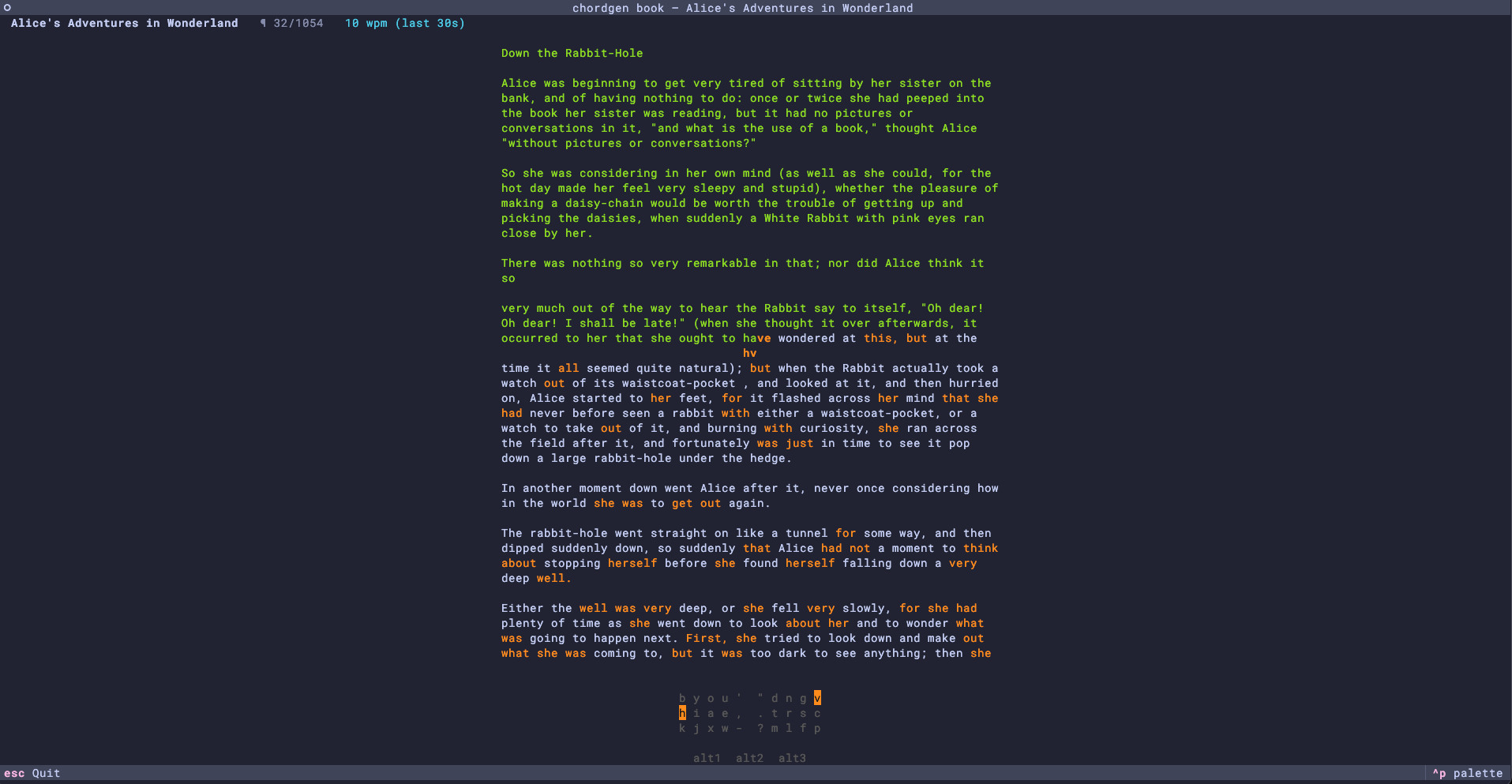
Type your way through an arbitrary book. Book mode is open-ended — there's no time limit and no FSRS state changes — and is designed for applying the chords you've already learned to real long-form prose.
Supported formats:
.txt(and.md, treated as plain text)..epub— parsed withebooklib.
What the screen shows
- Top bar: book title, current paragraph index, and a sliding-window
WPM (default last 30 seconds — see
book.wpm_window_seconds). - Middle: a window of the book centred on the word you're typing. Words you have already mastered (FSRS Review state) are highlighted in yellow — including the word you're currently typing — so you can see where to apply your learned chords; everything else is rendered plain.
- Below the text: chords for the current word are revealed only
when you've mistyped a learned word, rendered as
<chord><slot>(e.g.aufor the base,au1foralt1) directly beneath the word in the text block — same reveal-on-stumble UX as drill mode. - A typing mistake on a learned chord resets the current word to its first
character by default. Unlearned words continue from the character where
the mistake occurred. Set
book.reset_word_on_mistaketofalseto use that behavior for learned words too. - Punctuation attached to a word (
'Are,you?) is not part of the chord, so it is rendered plain rather than highlighted, and mistyping it neither reveals the chord nor resets the word. A reset returns you to the first letter of the word itself, leaving any leading punctuation typed. Because a chord emits a trailing space, that space is ignored when it arrives where trailing punctuation is expected: type the punctuation, then space, to advance. - Bottom: your keyboard layout. When you mistype a learned word
the chord keys are highlighted on the keyboard, and an
alt1 alt2 alt3indicator below the keyboard highlights the active alt slot (if any).
Alt chords
Alt-slot inflections from chords.csv (alt1 / alt2 / alt3)
are highlighted only once their own FSRS card has graduated on the current
mapping. Knowing car no longer marks cars learned automatically; learn
mode introduces and reviews each form independently. When you mistype a
learned alt form, the chord shown beneath the word is
suffixed with the slot digit (e.g. ca1 for an alt1) and the
alt indicator below the keyboard highlights the firmware modifier
you need to combine with the base chord.
Resume
Your cursor is automatically saved to ~/.config/chordgen/books.json
keyed by the SHA-1 of the book file's contents. Re-running
chordgen book <path> picks up where you left off — even if the file
has been moved or renamed since you last typed. Pass --restart to
forget the saved cursor and start from the beginning:
Navigation
Books often have a lot of front-matter (table of contents, copyright, etc.). Skip past it with the keyboard:
| Keys | Action |
|---|---|
← / → |
Move one word back / forward |
↑ / ↓ |
Move one line back / forward |
PgUp / PgDn |
Move half a screen-page of words back / forward |
Esc / Ctrl+C |
Save and quit |
The cursor always lands on a typeable word — punctuation-only and whitespace tokens are stepped over automatically.
Typeable text
Book text is normalised on load so users on a plain QWERTY layout
aren't blocked by untypeable glyphs. Smart quotes (“ ” ‘ ’),
em/en dashes (— –), ligatures (fi fl), accented Latin
(à é ñ ç æ œ ß …) and miscellaneous symbols (™ … • © ® ° × ÷)
are folded to their ASCII equivalents.
Configuration
Book mode reads a small block of config.yaml:
book:
  reset_word_on_mistake: true # Restart learned chord words after a mistake
  wpm_window_seconds: 30      # Sliding window for the running WPM
  max_width: 80               # Max width (chars) of the rendered text block
  always_show_chords: false   # Render chords beneath every learned word, not just on a stumble
The number of lines shown grows automatically to fill the available terminal height — the cursor's line is kept centred, with as many previous and following lines above and below as fit on screen. PgUp/PgDn jump by half the visible page.