learn
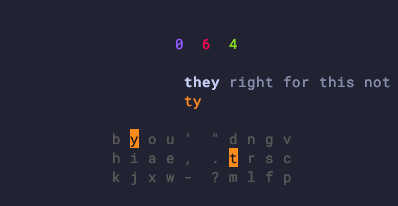
Interactive typing-practice TUI that drills your chords using spaced repetition. Long-term scheduling is backed by py-fsrs (the FSRS algorithm); in-session repetition rides on FSRS's own learning / relearning steps. Words flow horizontally across the screen — type each word followed by a space, and the next one is appended.
The session model mirrors Anki: each calendar day has a budget of
new_words_per_day brand-new words and reviews_per_day overdue
reviews. The session ends when the budget is empty and any in-flight
learning words have graduated.
- Words interrupted during learning or relearning resume first, even after quitting and reopening learn mode or exhausting a daily quota. Remaining slots are picked from cards overdue in the FSRS schedule (sorted by retrievability), using calendar-date comparison (Anki-style — anything due today appears). Then from words your typing speed has flagged as slow, then by descending frequency for words you've never seen. Review and new buckets are capped by the day's remaining budget.
- New / learning words show their chord directly under the word.
Brand-new cards show the chord for the first
learn.show_chord_stepsconsecutive correct reps, then hide it for the remaining learning steps before graduating. An error resets the step counter to zero, which brings the chord back. - Once a word has graduated to FSRS Review state and accumulated
learn.mastery_thresholdtotal reviews, the chord is hidden. If you later lapse on the word, the chord stays hidden during relearning — it only reappears on a current-word error. - Any mistake during a word grades the review as
Again, sending the card back into the learning queue. AnAgainon a card already in Review counts as a lapse; words that accumulatelearn.leech_thresholdlapses are flagged as leeches inchordgen difficult. Use that report to choose forms to practise or inspect before manually changingchords.csv. - Per-word speed grading measures from activation of the current word
through its committing space, including hesitation before a firmware
macro emits text. Clean words below
learn.slow_wpm_fractionof the rolling median are gradedHardinstead ofGood. The first word is measured too; error attempts are excluded from speed samples. Because upcoming words are visible, this mode measures throughput, not isolated recall. - When a word is rescheduled mid-session it's appended to the tail of the visible queue rather than inserted right after the current word, so the next word doesn't flip under your fingers.
- Under the chord row you'll see three Anki-style counts of the on-screen queue: blue = new, red = learning / relearning, green = graduated.
- Progress is persisted to
~/.config/chordgen/progress.jsonafter every word commit, so quitting mid-session never loses your daily counters or FSRS state. PressEscorCtrl+Cat any time to quit. - Once the day's quota is exhausted you land on a "No more words due
today!" screen — there's no per-session summary, because the learn
mode is about long-term retention rather than speed tests. For
speed practice on words you already know, use the separate
chordgen drillmode.
Learning word families
Assigned alt forms are separate practice cards. New forms become eligible
once their base has graduated, then use the same daily quota, hint fading,
and FSRS review rules as primary words. A hint such as lk2 means the lk
chord with alt2; the family label and keyboard indicator identify the
modifier. These follow your actual CSV slots, including irregular and manual
forms, rather than guessing suffixes. Each form's own source frequency is
used when present.
Learning look does not mark looks, looked, or looking mastered. Drill
and book highlight an alt as learned only after its own card graduates on
the current chord/layout/slot. Changing a slot requires relearning that form,
not the unaffected base. gen --preserve-learned also protects the owning
base and slot when an alt has been learned.
Isolated recall
Run chordgen learn --recall to hide the upcoming queue and show only the
active word. Timing starts when that prompt is displayed and ends at its
committing space. Existing hint fading still applies: assisted attempts
update FSRS, but only clean attempts without a chord hint contribute to
recall speed and latency measurements. This measures prompt-to-completion,
not raw physical key latency, and cannot distinguish typing from a chord.
Recall and flowing practice keep separate speed thresholds. On the first load after upgrading, older macro-output speed samples are discarded in memory while FSRS cards, repetitions, lapses, and daily quotas are retained. Loading does not change the file; the next answered word saves the migration.
Useful keys during a session
| Key | Action |
|---|---|
| any letter | type next character of the word |
Space |
commit a fully-typed word |
Backspace |
undo last letter |
Ctrl+W |
clear the current word (I recommend binding alt/ctrl backspace in your terminal to this and making a dedicated key on your keyboard if programmable) |
Esc / Ctrl+C |
quit |
Configuration
Relevant config.yaml knobs (under learn):
| Key | Default | Purpose |
|---|---|---|
show_words |
10 | Number of words shown on screen at once. |
new_words_per_day |
20 | Daily cap on brand-new words introduced (Anki-style). |
reviews_per_day |
200 | Daily cap on overdue / re-drilled review words surfaced. |
leech_threshold |
8 | Lapses (Again on a graduated card) before a word is flagged as a leech. 0 to disable. |
mastery_threshold |
3 | Total FSRS reviews before the chord is hidden for a graduated word. |
learning_steps |
5 | Consecutive corrects a new word needs before graduating. Error resets to zero. |
show_chord_steps |
3 | How many of the initial learning steps show the chord. After this the chord is hidden. |
relearn_steps |
2 | Consecutive corrects a lapsed word needs before re-graduating. Error resets to zero. |
target_retention |
0.9 | FSRS desired retention rate; affects long-term interval lengths. |
slow_wpm_fraction |
0.7 | Fraction of the rolling-median WPM under which a word is graded Hard. |
slow_min_samples |
20 | Minimum WPM samples collected before slow-grading kicks in. |